The pump, the defibrillator, the wheelchair: on the map, in its room.
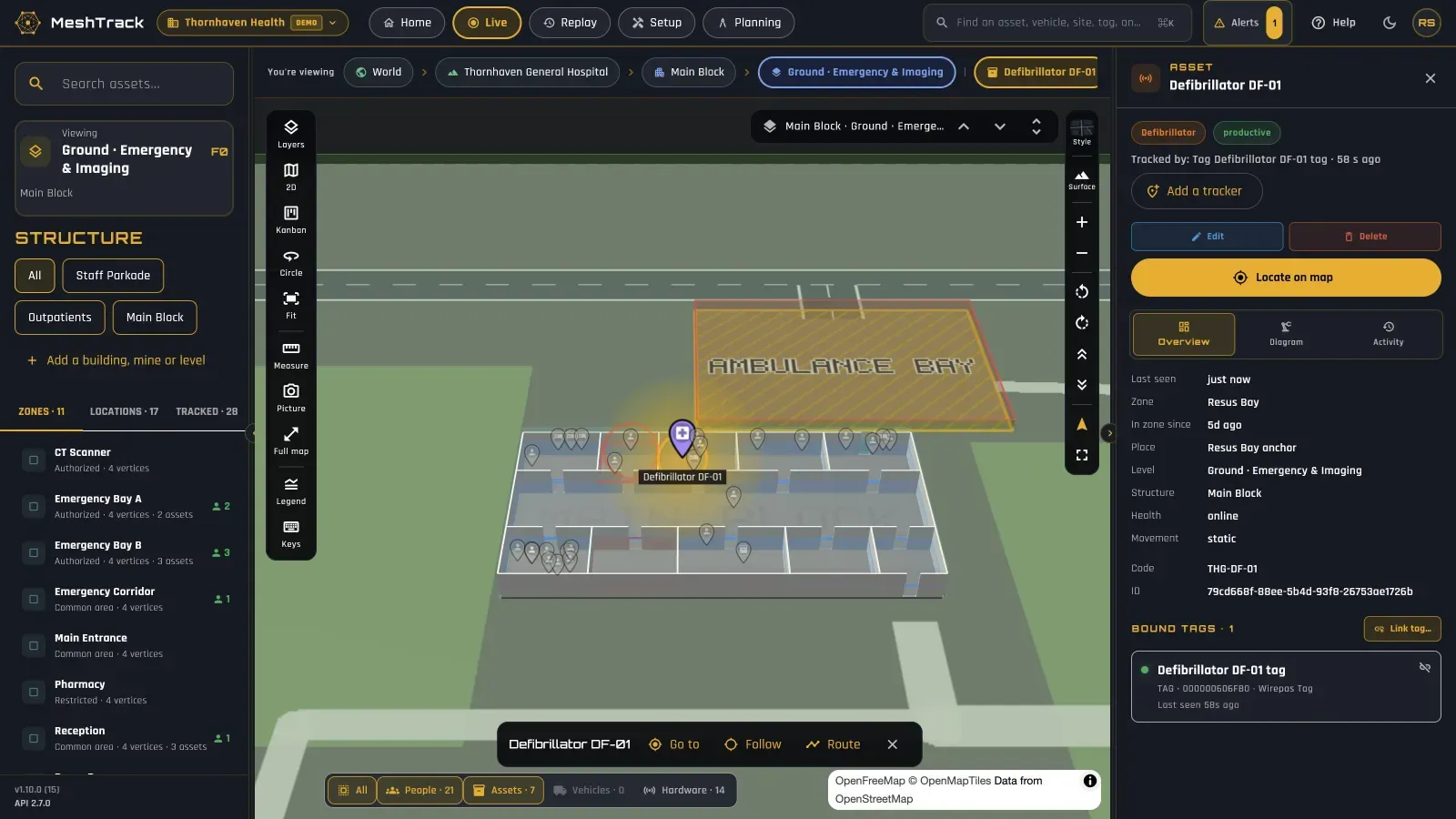
MeshTrack shows where tagged equipment is, floor by floor and room by room, across one hospital or a whole group. Porters and nurses search on their phones. Managers see what is used, what stands idle, and what has left its ward.
The problem
The questions you can't answer today.
“Where is the nearest free infusion pump, right now?”
Staff lose minutes walking wards to find a defibrillator, a monitor or a wheelchair.
“Why do we keep buying equipment we already own?”
Items are kept back on wards and never show up as spare.
“Who went into the pharmacy or the theatre store?”
Restricted areas with no record of what went in or came out.
“Where do patients and staff wait, and for how long?”
No view of occupancy and dwell by ward, emergency bay or department.
How MeshTrack answers them
One platform, from the map to the report.
Every answer comes from the same live map, alerts, reports and replay, on the web and on the mobile app.
Search and fly to it
Search any item and the map opens on its floor and room, with when it was last seen and how long it has been in that zone.
On the phone for porters and nurses
The mobile app has the live map, inventory search and alerts to acknowledge and resolve, on iPhone and Android.
Utilisation and idle reports
See what is used and what stands idle, by category and ward, before buying more.
Left-a-zone and restricted-zone alerts
Alert the right person when equipment leaves its ward or building, or anything enters the pharmacy, theatres or stores. Entries stay on record for audits.
Rooms and fridges
Temperature and humidity from sensor tags, with high- and low-temperature alerts by email, push, SMS or Telegram.
Flow and busy hours
Occupancy and dwell time by ward, emergency bay and department, and busy hours to plan staff and porters.
Battery and tamper
Every tag shows its battery and tamper status, and a device that stops reporting raises an alert.
One platform for a group
Each hospital and clinic modelled from its own plans. Users see only the sites they work at; reports run group-wide or one facility at a time.
Replay
Replay where an item went over the last 30 minutes, 2 hours, a day or a custom range: 90 days online, with archive retrieval up to 12 months.
The technology mix
Indoor hardware that suits a hospital.
Hospitals are indoor sites with plenty of rooms. Wirepas mesh or Bluetooth gateways locate tags room by room; sensor tags watch the conditions; the phone puts it in porters' hands.
Wards, theatres and corridors
Wirepas mesh
Battery anchors on the ceiling, about 10–12 m apart for room level. Indoor IP40 hardware from Teltonika suits offices and hospitals. Anchors last 5+ years, depending on the battery.
Areas with network already in place
Bluetooth gateways
The gateway hears the tag, so the position is the room or zone of the nearest gateway. Powered from the network on PoE.
Fridges, pharmacy and stores
Sensor tags
Temperature, humidity, movement, tamper and battery, from tags such as the Teltonika EYE Sensor Mesh, Minew S1 or MOKO MK Sensor.
Porters, nurses and managers
Mobile app
Search, live map, inventory and alerts on iPhone and Android; the web app for the control desk and reports.
MeshTrack is vendor- and technology-agnostic: several technologies can share one site, and every reading feeds the same map, alerts, reports and replay. See the platform.
Outcomes
What changes.
- 01
Found in seconds
Search an item and the map opens on its floor and room.
- 02
Buy on evidence
Utilisation and idle reports before buying more equipment.
- 03
Equipment stays where it belongs
Left-a-zone alerts when it leaves its ward or building.
- 04
Conditions watched
Temperature alerts for rooms and fridges.
- 05
One platform for the group
Every hospital and clinic on one platform, with access per facility.
Start small
Start with one ward, or one equipment pool.
Prove it where the pain is, against success criteria agreed up front, then add wards, buildings and hospitals on the same platform.
- 1 Pick one ward or one equipment pool: infusion pumps, wheelchairs or defibrillators.
- 2 Bring the floor plans (CAD or an image), or scan the rooms with an iPhone or iPad Pro with LiDAR. We review the anchor design before anything is installed.
- 3 Tag the equipment and go live. The mobile setup wizard takes about 12 minutes per area.
- 4 Measure against the agreed criteria, then add the next ward or hospital.
Related
The same platform, elsewhere.
Mining
Underground and open pit
Underground Now level by level, muster and roll-call, blast clearance, and the surface fleet on geofences. Supports your Regulation 16.7 duty.
Read moreLogistics & warehousing
Depots, DCs and fleets
Vehicles between depots, forklifts and cages inside, and dwell at gates and docks.
Read moreIndustrial & manufacturing
Plants and factories
Contractors in danger zones, muster head-counts, and tools with utilisation.
Read morePeople & safety
Who is on site, and where
Shifts, On site and Underground Now, muster, restricted zones and panic buttons, with an open privacy model.
Read moreHealthcare
Find it before it's needed.
Tell us about your hospital or group: the equipment you lose, the areas that matter and the wards to start with.